pruning extension
Two-level context control. Pruning is the first level, in front of pi's native compaction. When the context estimate reaches pi's own compaction threshold (the context window minus reserveTokens), pruning replaces the large tool outputs in the outgoing request with short references: a file pointer for read outputs, a shell summary for bash outputs, and a plain marker for everything else. The full outputs stay in the session file, which is never modified (ADR 0011). No LLM call is involved: the first level costs zero tokens.
When pi is about to compact on the threshold, the prune gate decides: if the context estimate after pruning is at most the window minus twice reserveTokens, pruning wins and the compaction is cancelled. Otherwise pi's native compaction runs unchanged as the second level. A recall tool resolves any recall reference back to the full output.
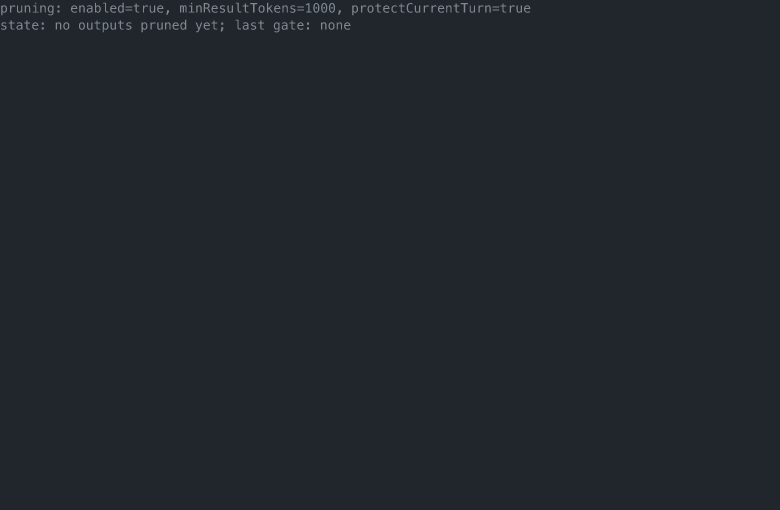
Screenshot
The /pruning settings display: the active settings and the current prune state, in dim text under the last message.
Behavior
- Engagement. Pruning engages the first time the context estimate exceeds
contextWindow - reserveTokens, the same threshold and the same effective window (context window cap included) that pi's own compaction and footer read. The estimate uses pi's token helpers: the last assistant usage plus a character estimate for the messages after it. Engagement is sticky for the session (ADR 0018): once it has engaged, it keeps engaging on every later request until a reset, so the outgoing prefix holds one shape and the provider's prompt cache stays hot. A reset is a compaction that runs (the raw size drops) or a session start, after which the session runs raw again until it re-crosses the threshold. - Eligibility. Tool result and bash execution outputs whose size estimate exceeds
minResultTokens. WithprotectCurrentTurnset, outputs after the last user message are never pruned. Image content parts are never replaced. - Markers.
read: the file path, the line range read, the size, an instruction to re-read with the read tool, and the recall reference for the exact old content.bash: the command, exit code, total line count, size, the first 10 lines, an omission note, the last 10 lines, and the recall reference. Summary lines are capped at 200 characters so one long line cannot make the marker as large as the output.- other tools: the tool name, the size, and the recall reference.
- Recall references. The line number of the result entry in the session file, permanent and branch-independent, so references keep resolving across forks and tree navigation. In an ephemeral session (no session file) the marker carries the 12 character entry id instead. The recall tool accepts both forms regardless of which the marker carries.
- Re-derivation. The pruned view is a pure function of the current messages and thresholds, re-derived on every request and never written to the session file. The only session state is the sticky Engagement flag (ADR 0018); a restart or resume recomputes the same pruned projection, and the flag resets with the session.
- Settling. After one request goes out pruned, the provider reports usage for the pruned size and the estimate drops back below the threshold, but the sticky Engagement flag holds it pruned, so there is no per-turn settling and no pruned/raw alternation (ADR 0018). The gate still settles on its own: it runs a fresh prune pass against the window minus twice the reserve.
- Second level. pi's compaction summarizes from the raw session entries and never sees the markers, so pruning never degrades summary quality. Manual
/compactand context overflow recovery always perform a real compaction; the gate acts only on the threshold reason. - Notifications. One info notification per session, when pruning first activates. No further notifications while it is stably active.
Settings
The pruning section of the settings files. The project <cwd>/.pi/settings.json overrides the global settings, key by key.
| Key | Default | Meaning |
|---|---|---|
enabled | true | Turn the first level on or off. |
minResultTokens | 1000 | A tool output smaller than this is never pruned. |
protectCurrentTurn | true | Never prune outputs after the last user message. |
compaction.enabled and compaction.reserveTokens stay pi's own settings. The two levels are independently switchable: pruning.enabled for the first level, compaction.enabled for the second. When auto-compaction is off, the gate never fires, but the context hook keeps pruning on its own switch.
Command
/pruning settings [key=value ...]
- No args: shows the three keys and a read-only state line (outputs pruned, tokens saved per request, last gate decision), then opens a picker to edit one key.
enabled=true|false,minResultTokens=N,protectCurrentTurn=true|false: sets the keys and persists them to the project settings file when one exists, else the global file.
Recall tool
recall with one argument, ref:
#<line>- the default form: up to 12000 characters plus a hint pointing at the full form.#<line>:full- uncapped.- an entry id, with the same optional
:fullsuffix.
Only tool result entries resolve; any other entry type is an error. A recall result is itself a tool output and is prune-eligible under the same rules; its marker points at the original entry.