resource-toggle extension
Enable and disable extensions, skills, prompt templates, and themes from inside a running session, without editing settings files by hand.
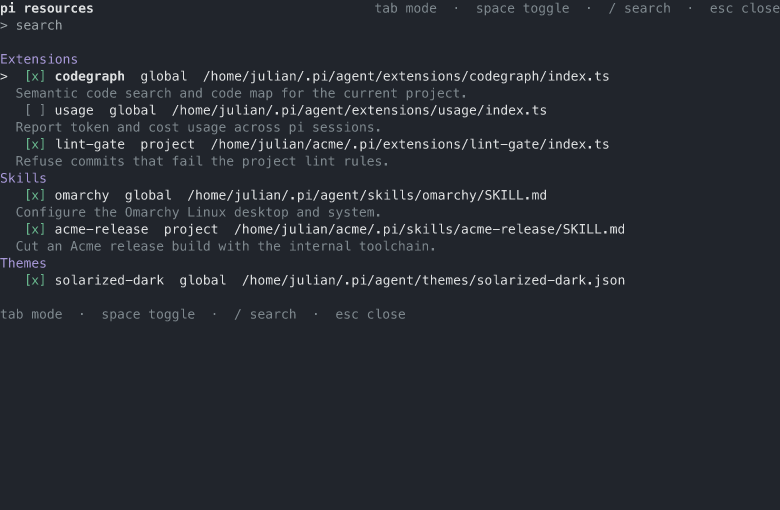
/resourcesopens the interactive list in TUI mode (a text table in the headless modes)./enable <name>,/disable <name>, and/inherit <name>change the state of one named resource;--projectselects project mode,--globalis the default.- A state command with no name opens the resource picker in TUI mode: a searchable single-pick list of every resource, filterable by name, path, or kind. A pick applies the toggle of that command in the active mode and closes on success; a no-op pick, a single-file package refusal, or a self-guard refusal says why and keeps the picker open. In RPC and print modes the command prints the resource table instead.
- While typing a state command, matching display names autocomplete inline, each with the resource's description.
- The
resource_toggletool lets the agent list resources and apply changes on request; with no arguments it opens the interactive list, and an action without a name relays the no-argument command, so the picker opens for the user.
State lives in pi's native settings override patterns - the same files and the same format pi config uses (ADR 0012). The commands and pi config are interchangeable: a change made in one shows up in the other.
Screenshot
The interactive list with the fixture resource set, grouped by type. The checkbox shows the state in the current mode; the usage extension is disabled by a settings pattern, so its box is empty. The dimmed line under a resource is its description, derived from the source file.
Behavior
- Write modes. Global mode writes the global settings (
<agent dir>/settings.json); project mode writes the project settings (<cwd>/.pi/settings.json). A project resource can be overridden in project mode;inheritclears that override so the resource returns to the global state.inherithas no global mode. - Immediate effect. Every change flushes the settings and reloads the session, so the change applies at once and survives a restart. The reload rebinds every extension, so the in-session state of other extensions resets.
- Self-guard. The extension refuses to disable or clear itself: doing so would remove the toggle commands from the session.
- Name matching. A name may be a display name, a unique name prefix, or a path fragment. A name that matches several resources is reported as ambiguous with the candidates listed, each with its description; a name that matches none is reported as not found.
- Package resources. A resource bundled in a package is toggled by a filter in the packages array of the settings (ADR 0029), not by a resource-array pattern. A local source is rewritten relative to the project directory so the project file stays portable. Toggling a resource from a single-file package source is refused with a clear message: pi loads a single-file source unconditionally, so its state cannot be toggled.
- Descriptions. The one-line description of a resource is derived from its source file at list time, never stored: the skill
SKILL.mdfrontmatterdescription, the prompt template frontmatterdescriptionfalling back to the first non-empty line, and the leading block comment of an extension entry file (a BOM or shebang line may precede it). The description shows in the picker, the completion list, the interactive list, the headless table, and the ambiguous-name candidates; it is capped at 60 characters in the table, and themes have no description. - Trusted projects only. Project mode requires a trusted project; in an untrusted project the TUI shows the restriction and project commands are refused.
- Headless modes. In print and RPC modes
/resourcesprints the table and the state commands work with a console report; the interactive list is TUI mode only.
Out of scope
- Installing or removing resources (enabling and disabling only).
- Per-session (non-persisted) toggles: every change is written to settings.
- Toggling pi's built-in tools. The tools extension covers built-in tools.
Tests
tests/resource-toggle/matcher.test.ts- name matching, ambiguity, and the argument-completion items.tests/resource-toggle/resolver.test.ts- resource discovery across scopes and the description derivation per resource kind.tests/resource-toggle/state-machine.test.ts- the pattern transitions for enable, disable, and inherit in both write modes.tests/resource-toggle/tui.test.ts- the interactive list rendering.npm run e2e:resource-toggle- a real pi RPC session: list, toggle, reload, the self-guard, the packages-array filter cycle (including the self-heal and a tilde-spelled local source), the single-file refusal, the no-name resource table, and the tool relay of a no-name action.